Understanding the Journal
The journal provides users with a free space to document their personal learning reflections and to capture what thoughts, feelings or experiences are important to them. Journalling as a practice has been known to help learners develop greater self-awareness and improve their emotional intelligence.
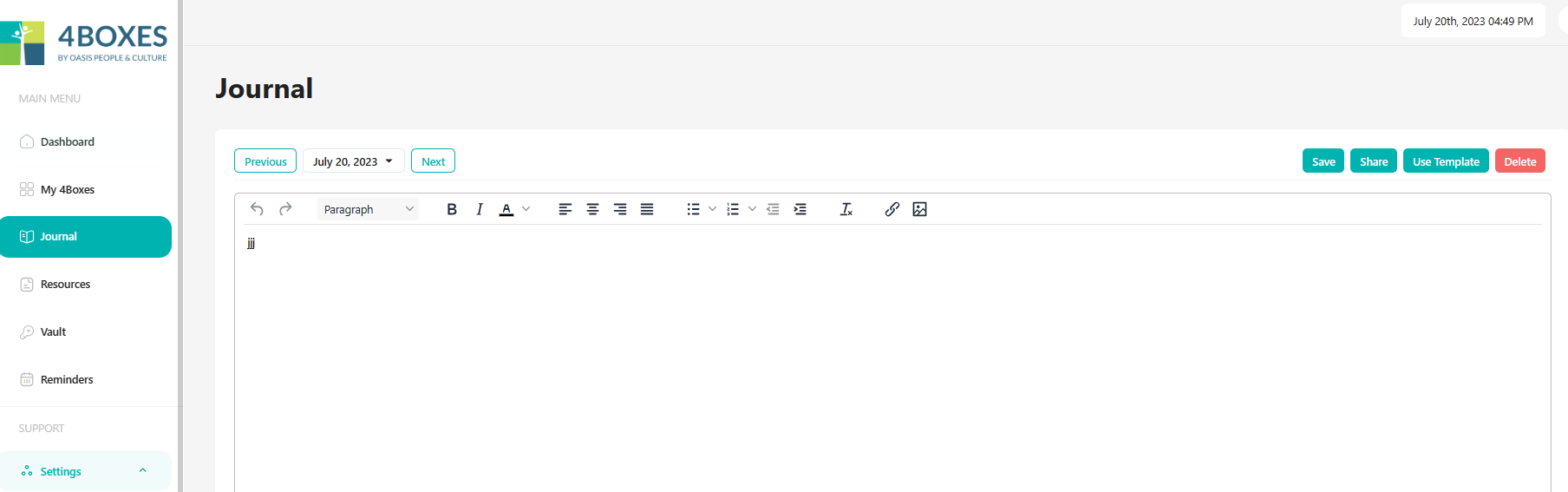
- Click on Journal from the Main Menu
- Use the free text space to make notes
- Use the WYSIWIG Editor to add your own style and formatting
- You can also attach images and links to your journal entries.
- Don’t forget to click Save to save your journal entry.
- For inspiration and structure to your journalling select from a range of Templates by clicking Use Template in the top right.
- Select from the range of template options. This imprints a journal template into the journal for that date. You can then add your own text in response to the template prompts in your journal. New journal templates are being added to this library regularly.
- Once again, don’t forget to click save
- If you would like to share a journal page with someone else, click Share.
- Click Copy to copy the URL
- Paste the URL into an email to the person you want to share the page with.
- They will only see that page as a single except from your journal.